GAD Logo
GAD.net   Personal   Hire Me!   Hobbies   Pets   Writings   GAD's Blog  

Archive for August, 2009

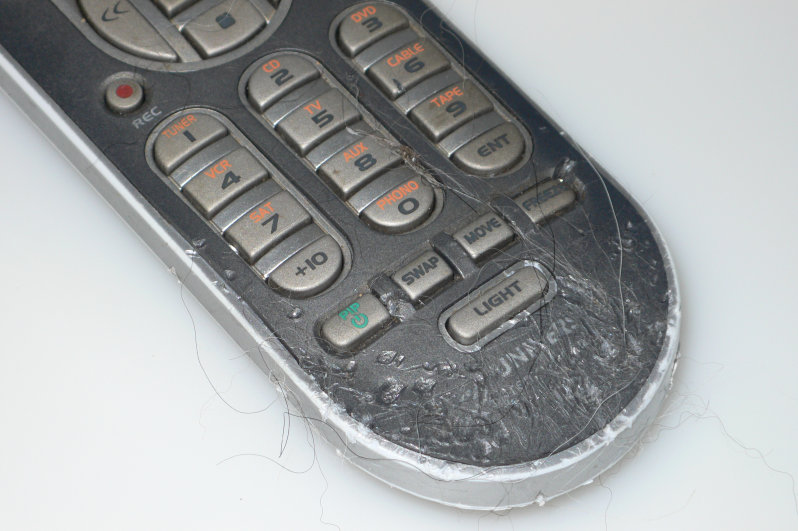
Death of a Remote Control

Posted in Annie, Dogs, Guinness on August 31st, 2009 by GAD – 2 Comments
Annie's Latest Hit - Side One

Annie's Latest Hit - Side One

This is a crime with only circumstantial evidence, a pretty clear motive, and two suspects.

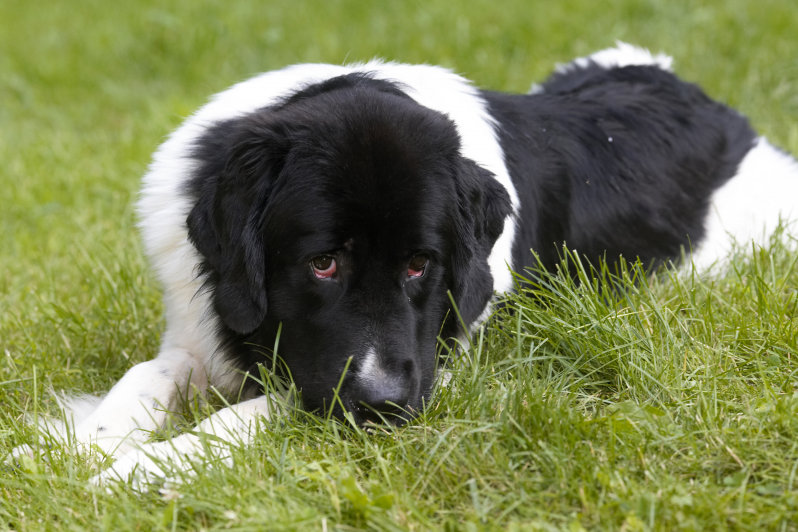
Two dogs were left alone for most of the day. At the end of said day, one universal remote control lay in critical condition. The culprit? That’s open for discussion. Of the two suspects, Annie has the longer rap sheet. Guinness, the resident good dog, has not been known to chew anything except marrow bones. We try not to jump to conclusions though, since we’ve been wrong before.

We had gone into the city to see a museum with the kids, so we were gone almost nine hours. Remarkably, this was the only thing destroyed in the house while we were gone.  We’d not left them alone for so long before and expected destruction on a biblical scale upon our return. Idle paws are the devil’s playground as it were.

Of course the remote control’s death is my fault. I should have known better than to leave anything so deliciously tempting out in the open. I’d become complacent from leaving it out without incident for so long. This time though, the limits of Newfy boredom were tested – and surpassed. Alas, the remote control was within the newfound limits. The sad part (to me) is that I had just programmed it so that it operated all of our many devices just the way I liked. Such is life.

I supposed I should consider us lucky. This remote was only $40 or so. The $150 remote was safe in the drawer while the drama unfolded. I liked this one better though. We’re just happy that she whoever did this didn’t eat the batteries.
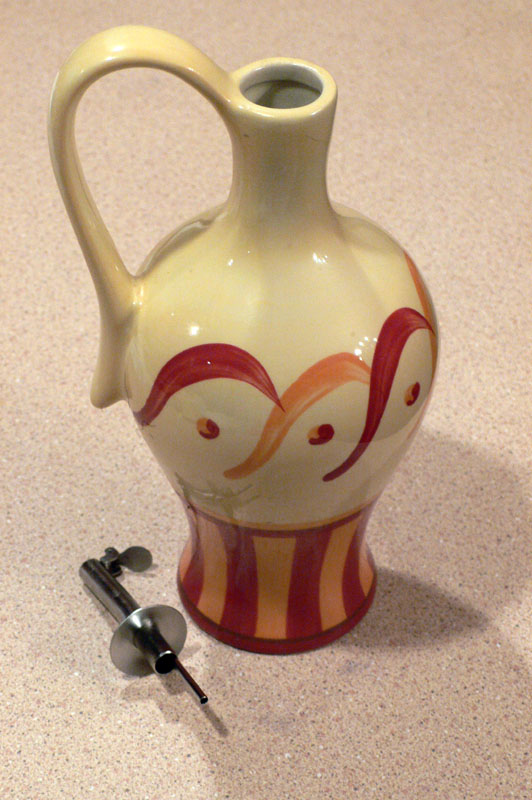
Ceramic Chew Toy

Hand Painted Ceramic Chew Toy

We later discovered further evidence of wrongdoing upstairs. As Lauren was making dinner, Colleen walked in asking, “Where do you want this?” She was holding Lauren’s hand made ceramic olive oil dispenser.

Colleen had found the dispenser on the living room couch. This was significant because we were all pretty certain that we had last seen it on the lazy Susan in the middle of the dining room table. Also significant was the fact that the jug was empty, where earlier in the day it had been at least partially full.

Forensics analysis seemed to indicate that Annie someone had carefully taken the jug from the center of the table, carefully carried it across first a tile and then a hardwood floor, then gently placed it on the couch. Annie Whoever it was  then gently chewed off the rubber stopper from the jug (apparently consuming the tasty rubber bits) and carefully consumed all the precious nectar contained therein. All without so much as a chip in the ceramic glaze.

There was no mess; no puddle of oil. There was no indication that there had been a crime aside from the misplaced decanter of oil. If Annie the perpetrator had been smart enough to put the jug back, we would have never known until we went to pour some sweet tasty oil. It might have been weeks before we would have discovered the empty container. Luckily, our dogs don’t have opposable thumbs or the common decency to clean up after themselves.

GAD

Share and Enjoy:
  • Print
  • Facebook
  • del.icio.us
  • Digg
  • Sphinn
  • Mixx
  • Google Bookmarks
  • Blogplay
  • RSS
  • Technorati
  • LinkedIn
  • MySpace
  • Reddit

What it Takes to be a Published Author

Posted in Writing on August 30th, 2009 by GAD – 2 Comments
My first published book

My first published book

Being a published author, I am constantly told what an amazing achievement it is. I agree, but I’ve accomplished other things in my life that were much more difficult. I have a second degree black belt in Tae Kwon Do for example. Still, there is something mystical to most people about being published that transcends other accomplishments. Perhaps we all lust for fame. Though I’m far from famous, if you google my name, my webpage or book will come up first. I guess I’m the most famous Gary A. Donahue on the Internet today. All because I’m a published author.

So what does it take to be a published author? It takes more than being a writer. A writer is someone who writes. Anyone can be a writer. To be a published author, you need to, well, be published. In my experience, here are some of the reasons that I’m published:

  • Perseverance – This one is big, and deserves to be first. I bothered my contact at O’Reilly, Inc. literally for years before he contacted me about writing this book. He felt that my writing was solid, but every time I submitted a proposal, the timing was off, or the proposed subject had already been done. When he had an opportunity that matched my skills and styles, he thought of me because we had stayed in contact. Be polite, and try to establish a rapport. People buy from people is the adage I’ve heard used in sales, and it applies.
  • Write well – This may sound silly, but I assure you, many writers can’t write worth a damn. Being an O’Reilly author, I’ve been invited to help edit other books. Some of the writing was pretty awful, and some of it was pretty great. Some of the writing was fun to read, and some of it was dry. If the grammar and spelling is bad, the story, details and message will never be read. Similarly, if the story sucks, and the grammar is impeccable, it won’t sell. Even seasoned writers are constantly refining their craft.
  • Care about what you write – Similar to writing well, the idea of caring about what you write takes it a step further. Is it OK to use OK? Is there a better choice for a word? If you swap a word for a synonym, will the sentence flow better while retaining its meaning? How do your words sound when read aloud? Would you want to read what you’ve written? Every word is a building block to the final product. As Mark Twain said, “The difference between the right word and the wrong word is the difference between lightning and the lightning bug.” Use the right word.
  • Write every day – One of the things I learned while writing Network Warrior was that I needed to write every day. If I didn’t get into the habit of writing, then I would go days or even weeks without accomplishing anything. My writing coincidentally, sucked. When writing every day, you’ll find that your writing will improve, and you’ll feel the need to write. A writer can’t help but write. For some this is the way they are wired. For others it’s a habit. Make writing a habit. I like Stephen Hunter’s take on this subject: “No matter which type [of writer] you are, you have to do it steadily, professionally, diligently, consistently. Otherwise here’s the type of writer you are: unpublished.”
  • Enjoy Editing – This was hard for me, since like many beginning writers, I was of the opinion that every sentence I wrote was perfect the first time I wrote it. Most successful  writers will tell you that the first draft of any manuscript is crap. Putting thoughts on paper is only the first step. I would go so far as to estimate that writing the first draft is at most, 25% of the process. In the case of a book being published, 10% might be more accurate. In William Zinsser’s excellent book, On Writing Well, he teaches that you should take any first draft and work on cutting it in half through editing. Not by deleting sections, though that may be necessary, but by removing unnecessary words. Every “He took a deep long breath of fresh cold, clean air” can be replaced with, “He took a deep breath”. Enjoying the editing process will make you a better writer. Don’t get attached to your edited manuscript though. Better editors will further reduce or change it during the publishing process.
  • Be Patient – writing takes time. Editing takes time. The many steps of publishing take time. Writing, as an activity or profession is not a thrill-seeking activity. Many hours are spent alone in front of a computer. When I’m in stream of consciousness mode, I can bang out 10 single spaced pages a day. Cut that to about three or four when writing about technology. That doesn’t include editing. Most publishers move slowly as well. From start to finish, my first technical book took me eighteen months. I could do it in less time today, but I’d still anticipate at least a year. If you’re dream is to have 10 books published, you better get to work. John Grisham, best selling author of many books including The Pelican Brief, spent three years on his first novel A Time to Kill.
  • Writing is harder than most people think – If you haven’t figured it out yet, writing is hard work. Many people think that they’ll write in their spare time and make millions of dollars. While John Grisham did just that with his first novel, it took him three years. It was also rejected repeatedly at first which brings us to the last bullet.
  • Enjoy rejection – The Pelican Brief was rejected by many publishers until Wynwood Press bought it. They gave it a modest 5000 copy first printing. As of 2009, Josh Grisham has sold over 60 million copies of his many books. If he had given up after his first rejection, or even his first ten rejections, we would not have films like The Pelican Brief, The Firm, and A Time to Kill, not to mention many others.

I can hear some of you asking, if writing is so damned difficult, why do you do it?

I need to write. I can’t help myself.

GAD

Share and Enjoy:
  • Print
  • Facebook
  • del.icio.us
  • Digg
  • Sphinn
  • Mixx
  • Google Bookmarks
  • Blogplay
  • RSS
  • Technorati
  • LinkedIn
  • MySpace
  • Reddit

What You Should Capture, and Why

Posted in Photography on August 25th, 2009 by GAD – 5 Comments
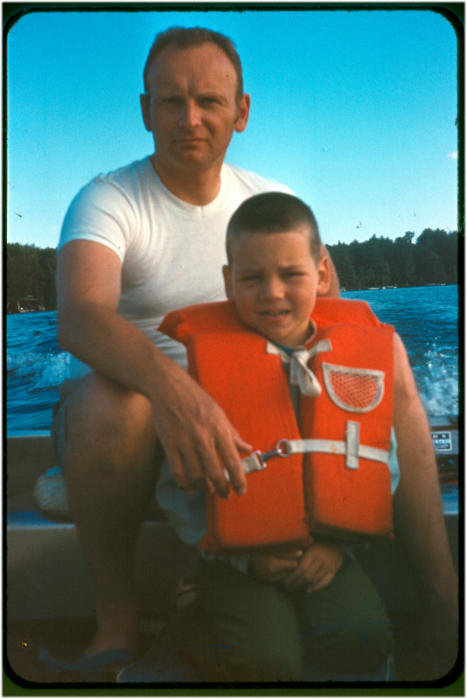
GAD's Dad & GAD

GAD's Dad & GAD in 1970

I have a family page that is private and only shared with family and friends. It contains images dating back to 1964. This site has taken me many hours of design, coding and other miscellaneous work over the years. I first made the site in 1999 so that my mother could see photos of my kids as they grew without having to wait for me to mail them. This was a great idea because I never mailed photos. The site has grown to a 40,000 image archive of my life, and the lives of my family. It is now a cherished heirloom.

The images contained in the site from the 60’s and 70’s are, for the most part, scanned from 30-40 year old slides. Many have deteriorated over time. I have endeavored to “fix” them as much as possible, but for many the damage of years of storage is too great to overcome. It gives me great solace to think that they will now be archived as digital replicas, thus progressing my father’s early photographic visions into the age of computers. He would have been absolutely thrilled at the idea.

To bear witness to the early history of my own life from my father’s point of view, is priceless beyond words. I encourage all reading this to take and archive more pictures of your children, and perhaps more importantly, of yourselves.

You see for years as I learned more and more about photography, I shied away from pictures of people. Perhaps my own inhibitions are to blame, but the fact remains that of my own honeymoon, I took hundreds of pictures, of which perhaps 20-30 contain images of myself and Lauren. Now 15 years later the landscapes are still beautiful, but they’re empty.

The Reason I Got a Nikon Slide Scanner

The Reason I Got a Nikon Slide Scanner

As I went through the exercise of scanning these slides, I realized something. Though the pictures my dad took of West Point in 1969 are beautiful, I really could not care less about them. You see the only pictures that matter – that’s worth repeating – the ONLY pictures that matter so many years later are the ones with family and friends in them. The images of places and things are mere curiosities, while the others – those with people I knew and loved, many of whom are no longer with us, THOSE images are the ones that make my heart swell and bring a tear to my eye.

A few years ago I got the chance to take pictures of the inside of the farmhouse I grew up in. It was a bittersweet joy because the house was being sold for the final time – to be torn down in favor of new construction. The memories that the inside of that house brought forth prompted me to look for old slides of the farm, so that others might wonder at the beauty of the farm where I grew up. What I found in my search for images surprised me. Images of my childhood, and of the people surrounding it, all meticulously cataloged 30-40 years ago. See I had a box of slides given me by my mother many years ago, and I had never looked in the box past the first layer. I never seemed to have had the time.

Scanning slides is an arduous process. The time spent however, has been so rewarding that it seems like no time at all. I also discovered an interesting thing during the process. My dad archived many images. I would estimate that perhaps 60-70 percent of them were people; family, friends and neighbors. Quite the opposite of my own shooting style as evidenced by my honeymoon.

With the birth of my daughters, my shooting style has changed. Probably 80% of my images are now of people. It was not a conscious choice, but rather a shift in what I cared to record as life marched on. How interesting that two small children could teach me a lesson I never realized I had learned. How amazing that my father, dead now some 27 years, could enlighten me to what I’d learned but never seen.

GAD's Dad & GAD on the Farm

GAD's Dad & GAD on the Farm

My dad’s name was Everett. He loved photography, and loved to teach me about it, though often I had no idea I was learning. My mother recently told me that my skill with a camera now surpassed his, a compliment which touched me to the very core. Indeed as I look at these older images, not all of them are of technical perfection. In many ways the best pictures were taken by my mom. Why? Because my dad is in them. He was the photographer, like me, who never had pictures of himself. My dad rarely smiled. To find an image of him smiling is a rarity. Still the captions he hand-wrote on the slide borders convey his absolute adoration for his son.

When I was little, my dad would sometimes let me sit on his lap while he drove the tractor. I found some pictures of this in the magic box of memories, and the images made me cry as I scanned them late at night with everyone else in bed asleep. Why? Because in those pictures he is smiling. So am I.

As I sat here scanning slides, I repeatedly thanked my dad for recording these images so that I could rediscover them so many decades later. Seeing his hand-written notes, and knowing that he was quite likely the last person to have touched the slides as he put them into their magazines, well you can imagine what that must have been like for me.

This web page, with its countless pictures is my way of recording my children’s lives for them. My hope is that in the future, they will never have to wish they had pictures of their childhood, or their mom or dad, or pictures of that house where they grew up. All of my photos – each and every one is my gift to them. I never understood that my father was creating gifts for me. Another lesson learned. Thank you Papa.

I emplore you all to take more pictures. Take more video. Include yourself any way you can. Find the shoebox of prints in your closet and put them into albums – better yet scan them and put them on CD or DVD. When your spouse or roomate asks you what you’re doing, tell them “Everett taught me that I should archive my pictures”. When they ask who Everett is, just smile and think of my dad. That’s what I do.

GAD

Share and Enjoy:
  • Print
  • Facebook
  • del.icio.us
  • Digg
  • Sphinn
  • Mixx
  • Google Bookmarks
  • Blogplay
  • RSS
  • Technorati
  • LinkedIn
  • MySpace
  • Reddit

GAD’s Digital Photo Management Scheme

Posted in Photography, Technology on August 24th, 2009 by GAD – 4 Comments
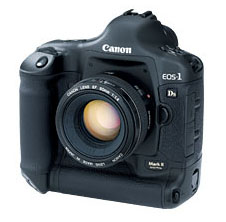
1dsmarkii_586x225

Canon 1Ds Mark 2

I take the archiving of my digital photos seriously. My photos are the archived memories of my family. I have developed over the years, a means whereby I sort, store, and archive them. I’ve been asked repeatedly how I do this, so I thought I would write it up once and for all.

I use a Canon 1Ds Mark II camera which is 16.7 Megapixels. I also shoot exclusively in Raw with the DSLR, which yields files that range in size between 13 and 22 megabytes each. Each of thes .CR2 raw files must be “developed” using special software. The resulting .jpg images create an additional file of about  two to four megabytes. Then I may crop or alter the file, making a new copy of the full-sized .jpg. Then there are the web-sized versions and the thumbnails which are only 100k or so. After all my editing, each single image capture from my camera might consume a total of 25 megabytes of disk space with all copies considered – more if there are many versions.

My first rule, is that I let the camera name the files according to whatever scheme it uses. I may configure it once, but I do not rename my image files. Thus I might get an image name entitled P1040730.jpg from my Panasonic point and shoot camera, or _B0Z6573.CR2 from my DSLR. Back in the days of my 1.2MP Kodak DC120 I would rename the photos, but now I take in excess of 10,000 images a year, and I just don’t have the time. Honestly I just don’t care about the image names anyway, opting instead to use directory names to identify each event.

As soon as I copy the images from the camera’s card, they are put onto a mirrored RAID pair of drives. I once had a drive fail during the transfer and I lost 6 Gig worth of pics. That was not a happy day. The next day I set up RAID so that a drive failure wouldn’t hurt me. Once they’re on the RAID pair, I delete them from the card. I have two drives for photography:

  • Current – two 250G mirrored drives
  • Archive – One 1TB drive

The Archive drive gets upgraded every year because it fills up. Luckily my disk space needs seem to run right behind what $100 will buy me that year, so it works out. Every couple of years I have to upgrade the mirror pair as well.

All of my photography web pages have an underlying hierarchy on the server. The top level will be a master archival index called archive-index.html. The next level will contain all of the years. Within each year are all of the event folders for that year. Each event folder contains the images and HTML for that event. The hierarchy can be thought of like this:

Archive-Index
   \-YYYY
       \- YY-MM-DD_EventNameWithNoSpaces
       \- YY-MM-DD_EventNameWithNoSpaces
   \-YYYY
       \- YY-MM-DD_EventNameWithNoSpaces
       \- YY-MM-DD_EventNameWithNoSpaces

On my computer, there is more complexity than on the web server, but the basic format is the same. The folder hierarchy for both the Archive and Current drives is the same.The root contains only year folders. The year folders contain event folders. The event folders contain that event’s raw files. The event folder might contain a Develops folder for processed jpgs, but will not if a point and shoot camera was used. The Event folder will also contain a duplicately named folder that will contain web-sized copies, thumbnails and HTML code. This folder will eventually be copied or moved to my HTML drive for inclusion into my Family page.

YY=Year, MM=Month and DD=Day. Thus:

YYYY                                         # There is nothing here but folders
   \- YY-MM-DD_EventNameWithNoSpaces         # This folder contains all the Raw files
       \- Develops                           # .jpgs developed from raw
       \- YY-MM-DD_EventNameWithNoSpaces     # Web sized versions of .jpgs

In practice, it might look like this:

2009
   \- 09-08-16_AnnieAndTheTrash
       \- Develop
       \- 09-08-16_AnnieAndTheTrash

   \- 09-08-17_GibsonLesPaulR8
       \- Develops
       \- 09-08-17_GibsonLesPaulR8

You might have notice the odd way in which I depict the date in my folder names. The year is listed first, then the month, then the day. In this way the folders always sort properly. If I were to use a normal American date format like 08-16-09_Event, then August-2009 would sort with August-2008 which makes me twitch. By using my format, the system will always sort properly. This is less of an issue with the event folders separated into year folders, but being this detailed always pays off in the long run.

There are some very specific aspects to the folder names. They have saved me countless hours of coding and have let me do some pretty cool things over the years.

  • Each section of the date: YY-MM-DD is separated by a hyphen
  • The date is separated from the event name by an underscore
  • There are never spaces or any non-alphanum characters in the event name
  • Each word in the event name is capitalized

These may looks like the random rantings of a crazed old programmer, and they are, but there is logic, and logic is our friend. By separating the date from the event name with an underscore, I can write scripts and trust that everything to the left of the underscore is the date, and everything to the right is the event name. By using hyphens, I can always parse the date. By never using spaces, I can guarantee that the folder name will work in all operating systems, and be understood by all browsers. Similarly, by not allowing characters like apostrophes, I can ensure that my script will work on multiple operating systems.

The folder with the web-sized versions of the images has the same name as the original because it will be copied in whole to my HTML drive where I will add it to my web page. The same logic works there as well. Once this folder is copied to the HTML drive, the folder names will be the same, and will be sorted the same way as the originals. Additionally, I’ll easily be able to tell from the folder name – which is included in the thumbnail HTML page – where to find the image on my drive.

Once I have all the pics processed and settled, I make two copies to DVD-DL. One DVD-DL stays home in the safe, and the other one goes to a safety deposit box at the bank. Seriously. I have a box at the bank that has nothing but hundreds of DVD disks in it. I could rebuild both my home PC and my servers in the event of a catastrophe.

At the end of each year, I copy the entire year over to the archive drive and create a new folder on the Current drive for the new year. I also delete the current year from the RAID pair which frees up space for the new year. Since the archived files are also backed up to multiple DVDs, there is no longer a need for RAID.

Share and Enjoy:
  • Print
  • Facebook
  • del.icio.us
  • Digg
  • Sphinn
  • Mixx
  • Google Bookmarks
  • Blogplay
  • RSS
  • Technorati
  • LinkedIn
  • MySpace
  • Reddit

Annie and the Screen Door – Part II

Posted in Annie, Dogs on August 22nd, 2009 by GAD – 4 Comments
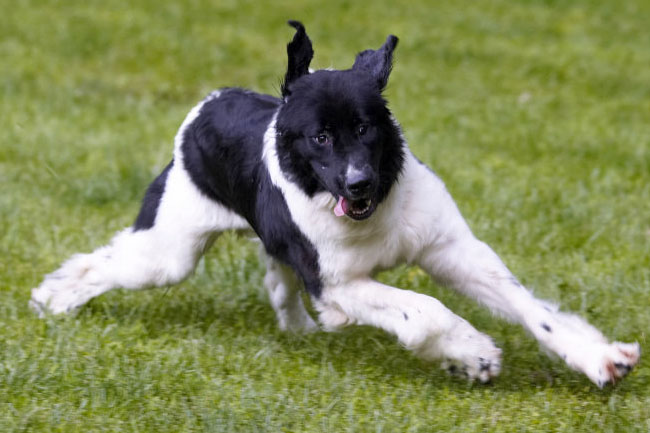
The Heebie Jeebies

The Heebie Jeebies

Eighteen hours.

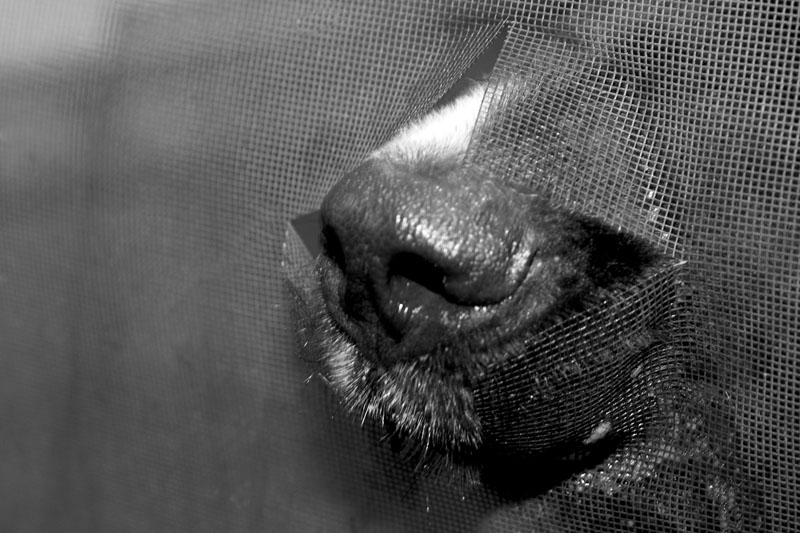
That’s how long the new screen door survived. We enjoyed the bug-free environment while it lasted, but alas, it was not meant to be. I know what you’re thinking. Let me help you to remove all doubt; Annie did it. This time there was no malice of forethought – no desire to do wrong. At least none that we could prove.

Annie had ruined the original screen weeks ago. I only bought a new one yesterday because the mosquitoes moved in with us. Without a screen door to keep them at bay, hoards of the winged bloodsuckers had flown into our house to feast on our warm bodies while we slept. While I’m fairly obsessive about keeping the doors locked at night, during the day they’re left open while we’re home. We don’t have air conditioning, so leaving the door open is the only way to get a breeze in that part of the house. With no screen to protect us, the insects had come a-callin’. Since Lauren had talked me out of hunting all the tiny vampires with my shotgun, I did the next best thing and bought a new screen door. Even with today’s prices, ammo would have been cheaper.

Annie is still a ferret puppy, and is therefore prone to attacks of crazed energy that my mother would call “the heebie-jeebies”. Regardless of where she finds herself during such an episode, she proceeds to run at flank speed until meeting an obstruction or simply deciding to change course. She then digs in and rebounds to run in a different direction, repeating the madness until boredom or exhaustion overtakes her. This maniacal behavior can happen at any time, but we’ve learned to expect it just after dinner. Yesterday was no exception, and Annie ran outside like a squirrel on a Red-Bull bender.

Deep in the midst of the heebie jeebies, Annie apparently decided that it was time to come back inside. As usual she ran up the 14 steps in two leaps, then rounding the corner of the deck, headed for the door. Without missing a beat, she continued her charge and leapt once more, soaring through the air towards the open door. This was the same door that had been open for weeks allowing her unfettered access to the house – the same door that had recently been covered with a new $128.95 screen.

The screen fought valiantly. Even with Annie’s considerable kinetic energy, the screen seemed to hold. Annie was the image of taught-muscled youth as she flew through the air. Her 100 ferret-pounds of mass met the screen dead center, her body crumpling into the tortured screen as the sickening sound of tearing fabric filled the air. As the door flexed under the attack, the force of impact caused the screen to tear perfectly across the bottom and halfway up one side. With the energy remaining from the impact, the screen ejected Annie unceremoniously to the deck. The battle was over; the screen had won. Though the screen had given its life to protect us from the large flying pest, it had successfully kept her out. Annie sat on the deck, no doubt confused by the sudden resistance where previously there had been none.

The screen had been here for all of 18 hours before it met its demise. Actually the screen still works pretty well, so I suppose it’s not a total loss. Because the screen tore on the edges, the door almost looks normal. Besides, now the dogs can come and go as they please through the new flap.  Marketing folks might even call it a design enhancement. My sanity on the other hand has taken another step down the very dark stairway to madness. Though I can’t see the bottom, I don’t think that there are many steps left.

GAD

Share and Enjoy:
  • Print
  • Facebook
  • del.icio.us
  • Digg
  • Sphinn
  • Mixx
  • Google Bookmarks
  • Blogplay
  • RSS
  • Technorati
  • LinkedIn
  • MySpace
  • Reddit


Back to:    GAD.net   Newf.net   Email:   gad@gad.net Copyright ©2010 Gary A. Donahue