GAD Logo
GAD.net   Personal   Hire Me!   Hobbies   Pets   Writings   GAD's Blog  

Photography

What You Should Capture, and Why

Posted in Photography on August 25th, 2009 by GAD – 5 Comments
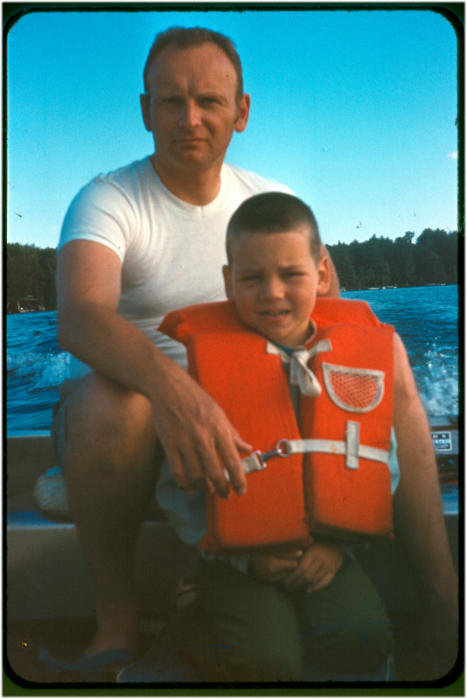
GAD's Dad & GAD

GAD's Dad & GAD in 1970

I have a family page that is private and only shared with family and friends. It contains images dating back to 1964. This site has taken me many hours of design, coding and other miscellaneous work over the years. I first made the site in 1999 so that my mother could see photos of my kids as they grew without having to wait for me to mail them. This was a great idea because I never mailed photos. The site has grown to a 40,000 image archive of my life, and the lives of my family. It is now a cherished heirloom.

The images contained in the site from the 60’s and 70’s are, for the most part, scanned from 30-40 year old slides. Many have deteriorated over time. I have endeavored to “fix” them as much as possible, but for many the damage of years of storage is too great to overcome. It gives me great solace to think that they will now be archived as digital replicas, thus progressing my father’s early photographic visions into the age of computers. He would have been absolutely thrilled at the idea.

To bear witness to the early history of my own life from my father’s point of view, is priceless beyond words. I encourage all reading this to take and archive more pictures of your children, and perhaps more importantly, of yourselves.

You see for years as I learned more and more about photography, I shied away from pictures of people. Perhaps my own inhibitions are to blame, but the fact remains that of my own honeymoon, I took hundreds of pictures, of which perhaps 20-30 contain images of myself and Lauren. Now 15 years later the landscapes are still beautiful, but they’re empty.

The Reason I Got a Nikon Slide Scanner

The Reason I Got a Nikon Slide Scanner

As I went through the exercise of scanning these slides, I realized something. Though the pictures my dad took of West Point in 1969 are beautiful, I really could not care less about them. You see the only pictures that matter – that’s worth repeating – the ONLY pictures that matter so many years later are the ones with family and friends in them. The images of places and things are mere curiosities, while the others – those with people I knew and loved, many of whom are no longer with us, THOSE images are the ones that make my heart swell and bring a tear to my eye.

A few years ago I got the chance to take pictures of the inside of the farmhouse I grew up in. It was a bittersweet joy because the house was being sold for the final time – to be torn down in favor of new construction. The memories that the inside of that house brought forth prompted me to look for old slides of the farm, so that others might wonder at the beauty of the farm where I grew up. What I found in my search for images surprised me. Images of my childhood, and of the people surrounding it, all meticulously cataloged 30-40 years ago. See I had a box of slides given me by my mother many years ago, and I had never looked in the box past the first layer. I never seemed to have had the time.

Scanning slides is an arduous process. The time spent however, has been so rewarding that it seems like no time at all. I also discovered an interesting thing during the process. My dad archived many images. I would estimate that perhaps 60-70 percent of them were people; family, friends and neighbors. Quite the opposite of my own shooting style as evidenced by my honeymoon.

With the birth of my daughters, my shooting style has changed. Probably 80% of my images are now of people. It was not a conscious choice, but rather a shift in what I cared to record as life marched on. How interesting that two small children could teach me a lesson I never realized I had learned. How amazing that my father, dead now some 27 years, could enlighten me to what I’d learned but never seen.

GAD's Dad & GAD on the Farm

GAD's Dad & GAD on the Farm

My dad’s name was Everett. He loved photography, and loved to teach me about it, though often I had no idea I was learning. My mother recently told me that my skill with a camera now surpassed his, a compliment which touched me to the very core. Indeed as I look at these older images, not all of them are of technical perfection. In many ways the best pictures were taken by my mom. Why? Because my dad is in them. He was the photographer, like me, who never had pictures of himself. My dad rarely smiled. To find an image of him smiling is a rarity. Still the captions he hand-wrote on the slide borders convey his absolute adoration for his son.

When I was little, my dad would sometimes let me sit on his lap while he drove the tractor. I found some pictures of this in the magic box of memories, and the images made me cry as I scanned them late at night with everyone else in bed asleep. Why? Because in those pictures he is smiling. So am I.

As I sat here scanning slides, I repeatedly thanked my dad for recording these images so that I could rediscover them so many decades later. Seeing his hand-written notes, and knowing that he was quite likely the last person to have touched the slides as he put them into their magazines, well you can imagine what that must have been like for me.

This web page, with its countless pictures is my way of recording my children’s lives for them. My hope is that in the future, they will never have to wish they had pictures of their childhood, or their mom or dad, or pictures of that house where they grew up. All of my photos – each and every one is my gift to them. I never understood that my father was creating gifts for me. Another lesson learned. Thank you Papa.

I emplore you all to take more pictures. Take more video. Include yourself any way you can. Find the shoebox of prints in your closet and put them into albums – better yet scan them and put them on CD or DVD. When your spouse or roomate asks you what you’re doing, tell them “Everett taught me that I should archive my pictures”. When they ask who Everett is, just smile and think of my dad. That’s what I do.

GAD

Share and Enjoy:
  • Print
  • Facebook
  • del.icio.us
  • Digg
  • Sphinn
  • Mixx
  • Google Bookmarks
  • Blogplay
  • RSS
  • Technorati
  • LinkedIn
  • MySpace
  • Reddit

GAD’s Digital Photo Management Scheme

Posted in Photography, Technology on August 24th, 2009 by GAD – 4 Comments
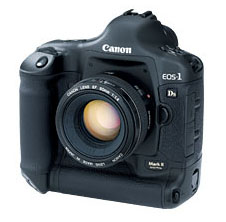
1dsmarkii_586x225

Canon 1Ds Mark 2

I take the archiving of my digital photos seriously. My photos are the archived memories of my family. I have developed over the years, a means whereby I sort, store, and archive them. I’ve been asked repeatedly how I do this, so I thought I would write it up once and for all.

I use a Canon 1Ds Mark II camera which is 16.7 Megapixels. I also shoot exclusively in Raw with the DSLR, which yields files that range in size between 13 and 22 megabytes each. Each of thes .CR2 raw files must be “developed” using special software. The resulting .jpg images create an additional file of about  two to four megabytes. Then I may crop or alter the file, making a new copy of the full-sized .jpg. Then there are the web-sized versions and the thumbnails which are only 100k or so. After all my editing, each single image capture from my camera might consume a total of 25 megabytes of disk space with all copies considered – more if there are many versions.

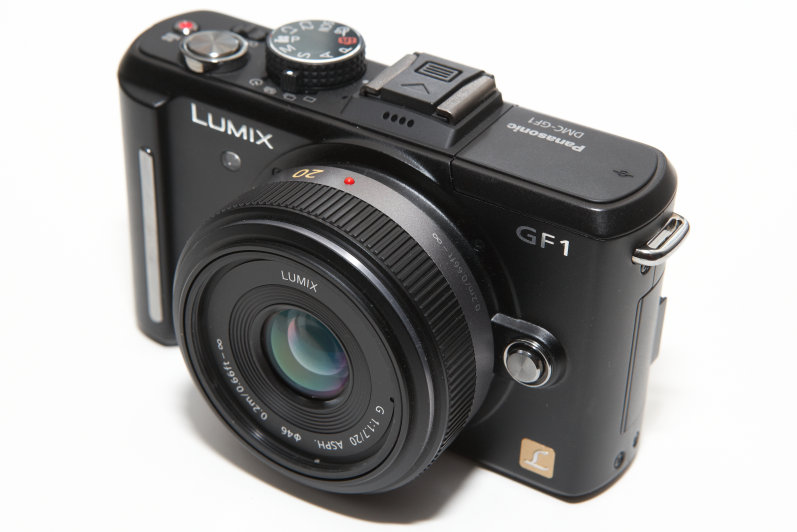
My first rule, is that I let the camera name the files according to whatever scheme it uses. I may configure it once, but I do not rename my image files. Thus I might get an image name entitled P1040730.jpg from my Panasonic point and shoot camera, or _B0Z6573.CR2 from my DSLR. Back in the days of my 1.2MP Kodak DC120 I would rename the photos, but now I take in excess of 10,000 images a year, and I just don’t have the time. Honestly I just don’t care about the image names anyway, opting instead to use directory names to identify each event.

As soon as I copy the images from the camera’s card, they are put onto a mirrored RAID pair of drives. I once had a drive fail during the transfer and I lost 6 Gig worth of pics. That was not a happy day. The next day I set up RAID so that a drive failure wouldn’t hurt me. Once they’re on the RAID pair, I delete them from the card. I have two drives for photography:

  • Current – two 250G mirrored drives
  • Archive – One 1TB drive

The Archive drive gets upgraded every year because it fills up. Luckily my disk space needs seem to run right behind what $100 will buy me that year, so it works out. Every couple of years I have to upgrade the mirror pair as well.

All of my photography web pages have an underlying hierarchy on the server. The top level will be a master archival index called archive-index.html. The next level will contain all of the years. Within each year are all of the event folders for that year. Each event folder contains the images and HTML for that event. The hierarchy can be thought of like this:

Archive-Index
   \-YYYY
       \- YY-MM-DD_EventNameWithNoSpaces
       \- YY-MM-DD_EventNameWithNoSpaces
   \-YYYY
       \- YY-MM-DD_EventNameWithNoSpaces
       \- YY-MM-DD_EventNameWithNoSpaces

On my computer, there is more complexity than on the web server, but the basic format is the same. The folder hierarchy for both the Archive and Current drives is the same.The root contains only year folders. The year folders contain event folders. The event folders contain that event’s raw files. The event folder might contain a Develops folder for processed jpgs, but will not if a point and shoot camera was used. The Event folder will also contain a duplicately named folder that will contain web-sized copies, thumbnails and HTML code. This folder will eventually be copied or moved to my HTML drive for inclusion into my Family page.

YY=Year, MM=Month and DD=Day. Thus:

YYYY                                         # There is nothing here but folders
   \- YY-MM-DD_EventNameWithNoSpaces         # This folder contains all the Raw files
       \- Develops                           # .jpgs developed from raw
       \- YY-MM-DD_EventNameWithNoSpaces     # Web sized versions of .jpgs

In practice, it might look like this:

2009
   \- 09-08-16_AnnieAndTheTrash
       \- Develop
       \- 09-08-16_AnnieAndTheTrash

   \- 09-08-17_GibsonLesPaulR8
       \- Develops
       \- 09-08-17_GibsonLesPaulR8

You might have notice the odd way in which I depict the date in my folder names. The year is listed first, then the month, then the day. In this way the folders always sort properly. If I were to use a normal American date format like 08-16-09_Event, then August-2009 would sort with August-2008 which makes me twitch. By using my format, the system will always sort properly. This is less of an issue with the event folders separated into year folders, but being this detailed always pays off in the long run.

There are some very specific aspects to the folder names. They have saved me countless hours of coding and have let me do some pretty cool things over the years.

  • Each section of the date: YY-MM-DD is separated by a hyphen
  • The date is separated from the event name by an underscore
  • There are never spaces or any non-alphanum characters in the event name
  • Each word in the event name is capitalized

These may looks like the random rantings of a crazed old programmer, and they are, but there is logic, and logic is our friend. By separating the date from the event name with an underscore, I can write scripts and trust that everything to the left of the underscore is the date, and everything to the right is the event name. By using hyphens, I can always parse the date. By never using spaces, I can guarantee that the folder name will work in all operating systems, and be understood by all browsers. Similarly, by not allowing characters like apostrophes, I can ensure that my script will work on multiple operating systems.

The folder with the web-sized versions of the images has the same name as the original because it will be copied in whole to my HTML drive where I will add it to my web page. The same logic works there as well. Once this folder is copied to the HTML drive, the folder names will be the same, and will be sorted the same way as the originals. Additionally, I’ll easily be able to tell from the folder name – which is included in the thumbnail HTML page – where to find the image on my drive.

Once I have all the pics processed and settled, I make two copies to DVD-DL. One DVD-DL stays home in the safe, and the other one goes to a safety deposit box at the bank. Seriously. I have a box at the bank that has nothing but hundreds of DVD disks in it. I could rebuild both my home PC and my servers in the event of a catastrophe.

At the end of each year, I copy the entire year over to the archive drive and create a new folder on the Current drive for the new year. I also delete the current year from the RAID pair which frees up space for the new year. Since the archived files are also backed up to multiple DVDs, there is no longer a need for RAID.

Share and Enjoy:
  • Print
  • Facebook
  • del.icio.us
  • Digg
  • Sphinn
  • Mixx
  • Google Bookmarks
  • Blogplay
  • RSS
  • Technorati
  • LinkedIn
  • MySpace
  • Reddit


Back to:    GAD.net   Newf.net   Email:   gad@gad.net Copyright ©2010 Gary A. Donahue